MyFinancialHealth

Your Financial Health – Right at Your Fingertips

MyFinancialHealth brings powerful credit and identity tools into Rosedale Bank’s online banking and mobile app, so you can understand where you stand, spot issues early, and move forward with confidence.

What Is MyFinancialHealth?

MyFinancialHealth is a financial wellness experience available inside Rosedale Bank’s online banking and mobile app. It gives you clear, easy-to-understand insights into your credit and identity—without judgment and without guesswork.

Whether you’re just starting out, managing more responsibilities, or working toward a fresh start, MyFinancialHealth helps you:

  • Monitor your credit
  • Protect your identity
  • Understand what impacts your financial picture
  • Take informed next steps—at your own pace

Select the Tools That Fit Your Needs

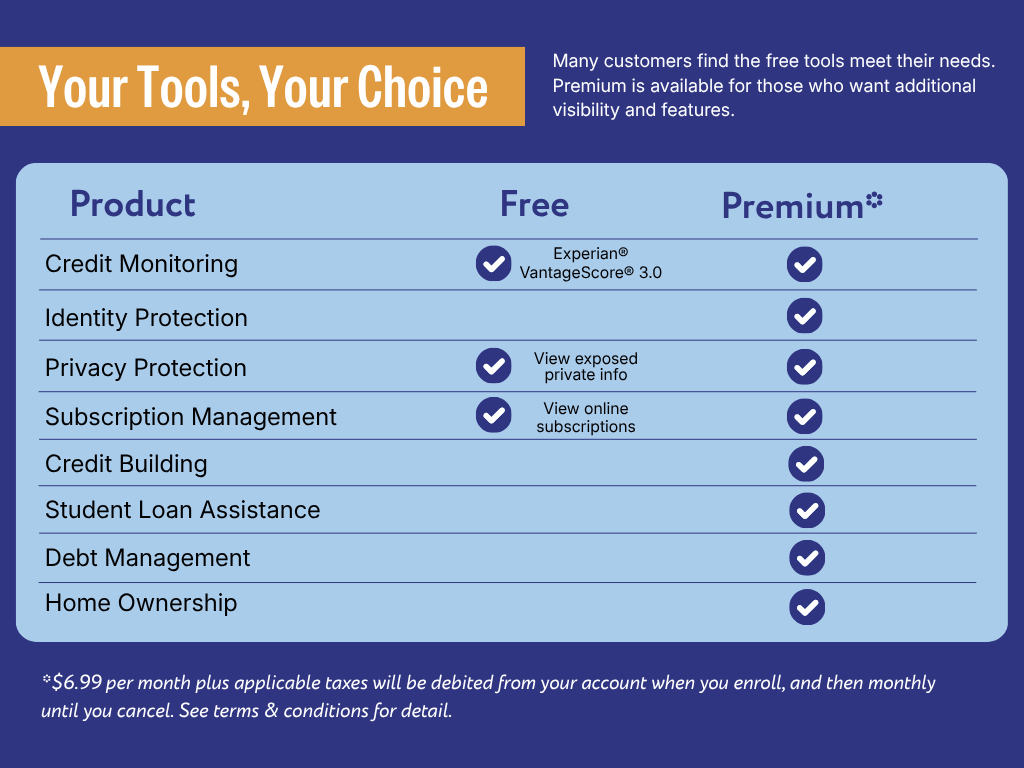
When you log in to MyFinancialHealth, you’ll have access to a suite of free tools—including credit score visibility, financial insights, and educational resources—right out of the gate. No upgrade required.

The free tools in MyFinancialHealth are a great place to start. If you’re looking for deeper monitoring, identity theft insurance, or hands-on support, you can upgrade to Premium for just $6.99/month (plus applicable taxes will be debited from your account when you enroll, and then monthly until you cancel).

Financial Wellness for Every Life Stage

No two financial journeys look the same. That’s why MyFinancialHealth supports you through every stage—with tools that grow along with you.

  • Person celebrating graduation

    Starting Out

    If you’re figuring out money, building credit, or trying to avoid early missteps, MyFinancialHealth helps lay a strong foundation with helpful tools. Confidence and clarity as you begin building your financial life.

    Starting Out
  • Group of friends walking down a city street

    Building Independence

    When you’re managing expenses and learning where your money goes, visibility matters. More control over your financial footprint – and fewer surprises.

    Building Independence
  • Pregnant, couple and woman on couch with bonding, tummy touch and support with maternity and motherhood. Future parents and affection on sofa with healthy pregnancy, embrace and excited for baby

    Growing Responsibilities

    As responsibilities increase, so does the need for proactive protection. Peace of mind, knowing someone’s watching out for you.

    Growing Responsibilities
  • Parents with child smiling on a couch

    Big Financial Decisions

    Major decisions require clear insight—not guesswork. Smarter, more informed decision-making when it matters most.

    Big Financial Decisions
  • Person making a payment with mobile device at a restaurant

    Rebuild & Reset

    Financial setbacks happen. MyFinancialHealth provides support—without judgment—so you can move forward. There’s always the next step.

    Rebuild & Reset

How to Access MyFinancialHealth

Getting started is simple:

1. Log in to Rosedale Bank Online Banking or the Mobile App

2. Select MyFinancialHealth

3. Follow the prompts to enroll—it only takes a few minutes

Once you’re in, your tools are always there when you need them.

Why It Matters

Financial wellness isn’t about perfection—it’s about progress. MyFinancialHealth is designed to meet you where you are and help you take the next right step, whatever that looks like for you.

And because it’s built into Rosedale Bank’s digital banking experience, you don’t need another app.

Frequently Asked Questions

MyFinancialHealth

MyFinancialHealth provides your Experian VantageScore® 3.0 credit score along with credit monitoring across all three major bureaus—Experian, TransUnion, and Equifax. You’ll receive alerts about key changes to your credit profile, helping you stay informed and protect your financial health.

Your credit score updates monthly. If you’re enrolled in the Premium Plan, you’ll also receive real‑time alerts whenever significant changes appear on your credit report from any of the three bureaus.

MyFinancialHealth uses the VantageScore® 3.0 model. Lenders may use different scoring models—such as various versions of FICO®—and may pull from different credit bureaus. Because each model weighs information differently, it’s normal for scores to vary.

If an alert seems inaccurate, review your credit report in MyFinancialHealth. For questions or corrections, you should contact the credit bureau that reported the information to get more details or begin a dispute.

Identity Theft

Our free identity protection service continuously monitors your personal information across the dark web and alerts you to potential fraud or unauthorized use. Customers who upgrade to the Premium Plan receive expanded protection, including Social Security number (SSN) monitoring, change‑of‑address alerts, Identity restoration support if identity theft occurs. These features help you detect threats early and take action quickly.

If suspicious activity or unauthorized use of your personal information is detected, you’ll receive an alert in your online banking dashboard. These alerts help you respond promptly to potential identity theft or fraud attempts.

From the dashboard in online banking, select “View more” within the credit and identity protection services tile and choose “Identity Alerts” on the left-hand menu bar. This page displays alerts related to your identity monitoring.

Personal Information Protection

Personal Information Protection is a service that helps safeguard your personal data by scanning the internet for your information and requesting its removal from data broker sites. This reduces your online exposure, limits unwanted data sharing, and helps protect you from identity theft and privacy risks.

You can view a detailed report by navigating to the Personal Info Protect view. This view lists every site where your information has been found, the type of data exposed, and the status of any removal or protection actions taken on your behalf.

Subscription Manager

Subscription Manager refreshes your subscription data daily for Premium users and weekly for Free users. This ensures you always have an up‑to‑date view of your recurring charges and active subscriptions.

Subscription Manager automatically identifies and tracks recurring payments linked to your primary financial accounts, including: streaming services, software and app subscriptions, gym and fitness memberships, digital services and other recurring monthly charges. If a charge repeats on a regular cycle, Subscription Manager is designed to help you monitor it.

If none of your connected accounts show recurring charges, Subscription Manager will display no active subscriptions. This simply means there are no subscription‑type transactions associated with the accounts you’re logged into.

Subscriptions tied to joint accounts will appear in Subscription Manager and will be labeled as connected to that joint account. Any recurring charges on accounts you share with another person will still be visible to you.

Subscription Manager retrieves subscription information directly through the online banking APIs provided by our Online Banking Platform (OBP). Data is only accessed after you enroll in the feature, ensuring secure and accurate subscription tracking.

Student Loan Aid

There are two main types of student loans: federal student loans and private student loans.

Federal student loans are issued by the U.S. Department of Education. They come with standardized terms, fixed interest rates, income‑driven repayment (IDR) options, and borrower protections such as deferment, forbearance, and forgiveness programs.

Private student loans are offered by banks, credit unions, and state‑based lenders. Terms vary by lender, interest rates may be variable, and they typically lack federal protections.

Understanding the difference helps borrowers choose the most affordable and flexible repayment path.

To identify whether your loan is federal or private:

Check your loan documents. Federal promissory notes and billing statements list programs such as the Direct Loan Program, Federal Perkins Loan Program, or FFEL Program.

Log in to StudentAid.gov. Use your FSA ID and navigate to My Aid to view all federal loans, balances, statuses, and disbursements. If a loan does not appear on StudentAid.gov, it is likely a private loan.

Subsidized loans are based on financial need. The government pays the interest while you’re in school, during your grace period, and during approved deferment.

Unsubsidized loans are not need‑based. Interest accrues from the moment the loan is disbursed, and the borrower is responsible for all interest.

Income‑driven repayment plans adjust your monthly student loan payment based on your income, family size, and federal poverty guidelines. IDR plans typically cap payments at a percentage of your discretionary income and may offer loan forgiveness after a set number of qualifying payments.

What happens if I default on a student loan? Defaulting on a student loan can lead to:

  • Significant credit score damage
  • Wage garnishment
  • Tax refund or Social Security offsets
  • Loss of eligibility for federal repayment plans and benefits

Borrowers with defaulted federal loans may qualify for the Fresh Start program, which restores access to IDR plans and other protections.

A grace period is the time after you graduate, withdraw, or drop below half‑time enrollment when you are not required to make payments. Most federal loans offer a six‑month grace period, giving borrowers time to prepare for repayment.

Federal Direct Consolidation combines multiple federal loans into one, simplifying repayment.

Private refinancing replaces one or more loans with a new private loan, potentially with a lower interest rate. Important: Refinancing federal loans with a private lender permanently removes federal benefits such as IDR plans, forgiveness programs, and deferment options.

Submitting multiple IDR applications through different platforms (for example, starting with us and then switching to FSA) can trigger a manual review, slowing down processing. For the fastest experience, complete your enrollment through a single provider.

You’ll need:

  • Your income information
  • Basic family and household details
  • Access to your loan servicer account

This information allows us to analyze your student loan portfolio and complete the enrollment forms accurately.

Due to high demand, some loan servicers may take 2–4 weeks to review applications. You can check your status by:

  • Logging into your loan servicer account
  • Reviewing your Message Center for updates or requests for additional information

Most IDR plans become active within two weeks after approval. Setting up autopay with your servicer helps ensure on‑time payments and may qualify you for an interest rate discount.

Under current law, student loan forgiveness is not taxable through 2025. Beginning in 2026, forgiven loan amounts may be considered taxable income. Taxes are typically due the year after forgiveness. We’ll notify you of any tax implications when you select a repayment plan.

Because of high enrollment volume, we recommend checking your loan servicer account weekly. Look for:

  • New messages
  • Requests for documentation
  • Updates on your repayment plan status
  • Staying proactive helps prevent delays.

Build Credit Rent

Rent reporting is the process of sending your on‑time monthly rent payments to a major credit bureau so they appear as a positive tradeline on your credit report. When your rent history is reported, it can help you build credit or improve your credit score by showing a consistent pattern of on‑time payments.

We require the renter’s name, address, lease information, and a copy of your lease. In some cases, we may also need verification from your landlord or property manager to confirm the lease and payment history.

No. We only report on‑time, positive rent payments. This protects renters from potential negative credit impacts and ensures rent reporting is a safe way to build credit.

We can report up to 24 months of past rent payments for the same lease. This “look‑back reporting” can help you boost your credit history quickly if you’ve been paying rent on time for years.

Most landlords and property managers do not automatically report rent payments to the credit bureaus. Rent data only appears on your credit report when a rent reporting service collects, verifies, and submits it on your behalf.

Yes. Your information is protected using industry‑standard encryption, and we comply with all relevant consumer protection laws, including the Fair Credit Reporting Act (FCRA). Your data is handled securely from submission through reporting.

User Account Management

From the dashboard in online banking, click on “View more” within the carousel component and navigate to the “Manage Account” section in the left-hand menu bar. Click on “Edit plan” and then “Change payment method” to change which primary account the user wishes to pay from. From there, you can select a different primary account to pay from. If you only have one primary account, the option to change it will not appear.

From the dashboard in online banking, click on “View more” within the carousel and open ‘Manage Account’ section, select ‘Edit plan’ and then “Cancel Premium Plan”. Your plan will remain active until the end of your current billing cycle. On your next billing date, you will not be charged and will automatically return to the free Basic plan.

If you want to fully opt out of the service, return to the Manage Account section and complete the unenrollment steps.

After canceling, you’ll continue to enjoy all Premium features until your current billing cycle ends. Once the cycle closes, your account will automatically transition to the Basic (free) plan.

You can unenroll from the My Account section at any time. If you change your mind later, you can easily enroll again.

Payment Processing

Existing users will experience a smooth transition. No users will be back‑charged for any period prior to activating the new payment system. Billing for the premium service begins on each user’s next scheduled renewal date after payment processing is turned on.

Users can view their renewal date by navigating to the Manage Account page within MyFinancialHealth. Their next billing date is displayed directly on that page.

When a premium plan payment processes:

  • Merchant Name: The financial institution’s name, truncated to 16 characters
  • Transaction Description: The name of the premium plan

This helps users easily recognize MyFinancialHealth premium charges on their statements.

If the pay‑from account is no longer active, the payment will fail. The user will automatically be downgraded to the free plan, and they will receive a notification about the downgrade.

If a payment attempt is unsuccessful due to NSF, the transaction will fail and the user will be downgraded to the free plan. A notification will be sent to inform the user of the change.